Presets
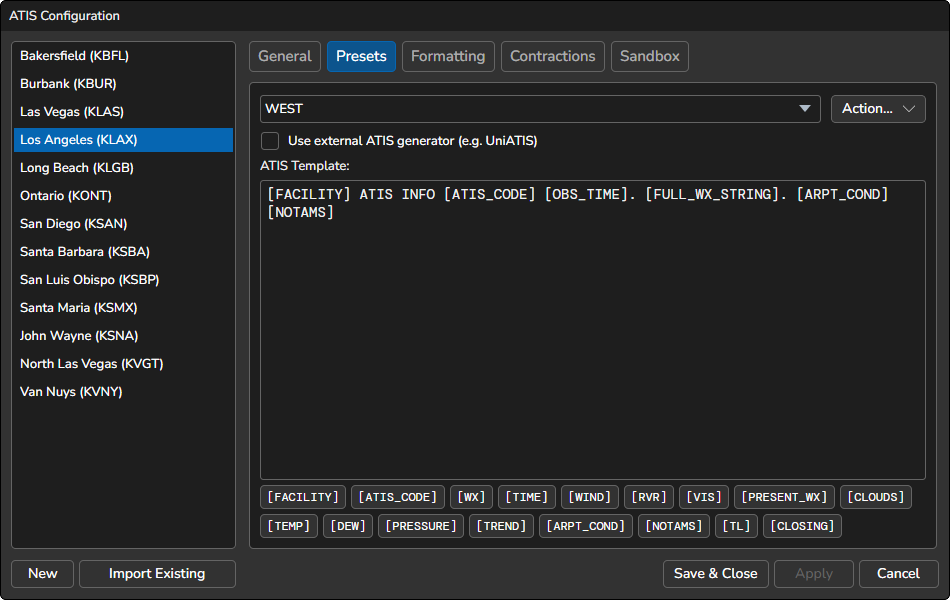
The Presets tab allows you to manage your presets by adding, copying, renaming, or deleting them. The text box below the dropdown list is where you can customize the ATIS template. When an ATIS is generated, the variables will be replaced with actual data. If the ATIS station is configured to use Text to Speech, the template text will be synthesized and transmitted.
You can use the following variables in the ATIS template. If you want to use the voice translated text instead of the raw text value in the text ATIS, you can optionally suffix the variable name with :VOX (e.g., [WX:VOX]). A variable can also be written with a dollar sign instead of square brackets (e.g., $WX or $WX:VOX).
| Variable | Definition |
|---|---|
[FACILITY] | The airport identifier (e.g. KLAX) in the text ATIS, and the airport name in the voice ATIS |
[ATIS_CODE][ATIS_LETTER][LETTER][ID]
| The current ATIS letter code |
[WX][FULL_WX_STRING]
| Inserts the weather elements in the standard order:Surface Wind, Visibility, RVR, Present Weather, Clouds, Temperature and Dew Point (joined as TT/DD in the text ATIS), Altimeter, Recent Weather, Wind Shear, Runway Condition, Trend
|
[METAR] | The complete, raw METAR as received (e.g. KSFO 031856Z 28012KT 10SM FEW015 18/11 A3002), without a leading “METAR” keyword |
[OBS_TIME][OBSTIME][TIME]
| The observation time of the METAR |
[WIND][SURFACE_WIND]
| The reported surface wind |
[RVR] | The runway visual range (if available) |
[VIS][PREVAILING_VISIBILITY]
| The prevailing visibility |
[PRESENT_WX][PRESENT_WEATHER]
| The present weather conditions (e.g., rain, snow, hail, etc.) |
[CLOUDS] | The reported cloud conditions |
[TEMP] | The reported temperature |
[DEW] | The reported dew point temperature |
[PRESSURE][QNH]
| The reported pressure value |
[PRESSURE_XXXX] | The altimeter setting from the METAR of another airport. Replace XXXX with its ICAO identifier (e.g. [PRESSURE_KSFO]) |
[QFE|ELEVATION_FT] | The runway threshold QFE. Replace ELEVATION_FT with the runway threshold elevation in feet |
[TREND] | The TREND forecast from the METAR |
[RECENT_WX] | The recent weather conditions |
[WS] | The wind shear information from the METAR (see Wind Shear) |
[RWY_COND][RUNWAY_CONDITION]
| The runway conditions (runway state) reported in the METAR (see Runway Condition) |
[RMK_WIND] | The wind reported in the METAR remarks (see Remark Wind) |
[AUTO] | Inserts the Automatic Observation text, only when the METAR is flagged AUTO (see Automatic Observation) |
[ARPT_COND][ARRDEP]
| Inserts the Airport Conditions: the free-form text and the selected static messages. The static messages come first when Include before free-form is checked, and the two parts are joined with a space. |
[NOTAMS] | Inserts the NOTAMs: the free-form text and the selected static messages, in the same way, with the two parts joined with a period. The result is placed in the NOTAMs template on the Formatting tab. |
[TL] | Inserts the transition level based on the configured ranges in the Transition Level formatting tab (non-US ATIS only) |
[CLOSING] | Inserts the closing statement message |
External ATIS Generator
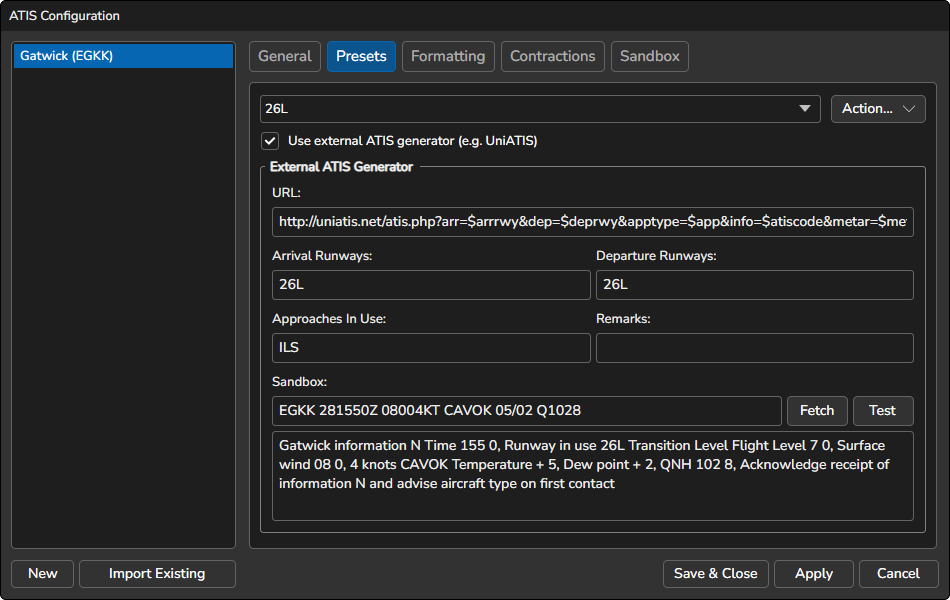
A preset can get its ATIS from a web service such as UniATIS instead of building it from the template. Select a preset, then check Use external ATIS generator (e.g. UniATIS). The checkbox is only available while a preset is selected, and the setting belongs to that preset, so each preset can use a different generator or none.
When the checkbox is checked, the template editor is replaced by the External ATIS Generator settings, and the ATIS is whatever the generator returns. The preset template and the Formatting settings are not used.
- Text ATIS URL: The URL that returns the text ATIS.
- Voice ATIS URL: The URL that returns the ATIS to be spoken. If the generator has no separate voice output, use the same URL as the text ATIS.
- Arrival Runways, Departure Runways, Approaches In Use and Remarks: Values to pass to the generator. They are converted to uppercase as you type.
If a URL is left empty, that ATIS can’t be generated and vATIS shows an error.
URL variables
Put these variables in either URL, and vATIS replaces them each time it generates the ATIS. The variables are case-sensitive.
| Variable | Replaced with |
|---|---|
$metar | The current METAR |
$atiscode | The current ATIS letter |
$arrrwy | The Arrival Runways field |
$deprwy | The Departure Runways field |
$app | The Approaches In Use field |
$remarks | The Remarks field |
The METAR and the field values are URL-encoded for you. If a URL does not start with http:// or https://, vATIS adds http://.
The response
The generator should return plain text. Before using it, vATIS removes the square brackets around any text (keeping the text), replaces <br> with a line break, and collapses repeated spaces. Line breaks in the response itself are ignored, so use <br> where you want a new line.
The voice ATIS then goes through the same preparation as other voice text: your contractions (@name) and + airport and navaid identifiers in the response are replaced before it is spoken. See Text Parsing and Contractions.
Click Test in Sandbox to apply your changes and open this preset in the Sandbox, where you can enter or fetch a METAR and generate the ATIS.
D-ATIS
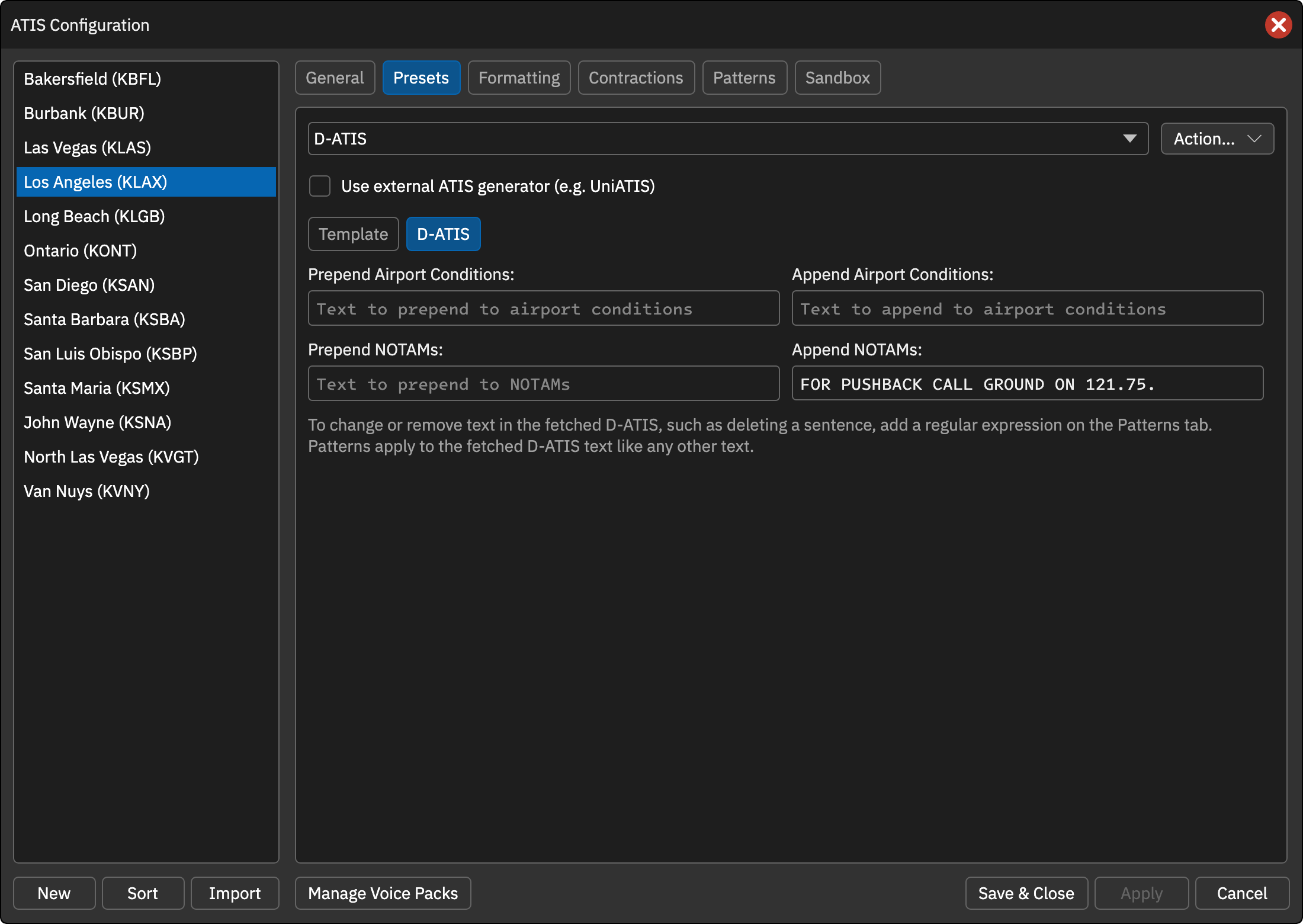
When the selected preset is named D-ATIS a D-ATIS sub-tab is shown next to the Template sub-tab. It controls the text added to the real-world D-ATIS before it is placed in the Airport Conditions and NOTAMs fields when Automatically fetch D-ATIS is enabled. The settings are saved per station.
- Prepend / Append Airport Conditions: Text added before or after the fetched airport conditions.
- Prepend / Append NOTAMs: Text added before or after the fetched NOTAMs.
To change or remove text in the fetched D-ATIS, such as deleting a sentence you do not want, add a regular expression on the Patterns tab. Patterns are applied to the fetched D-ATIS text like any other text.
The Sandbox also fetches the current real-world D-ATIS when the D-ATIS preset is selected, so you can use it to check the effect of these settings.