User Settings
The User Settings window can be accessed through the vATIS Main Window by clicking the User Settings button.
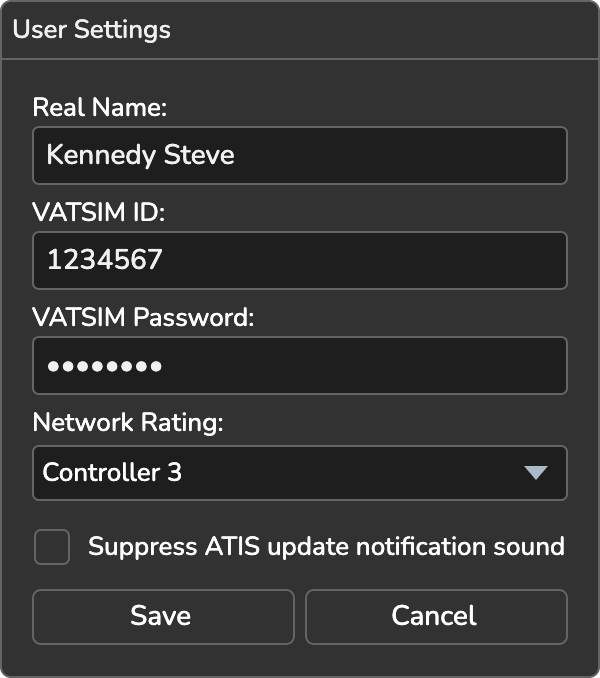
- Real Name: your real name or CID to display to pilots and other controllers on the network
- VATSIM ID: your VATSIM CID (digits only)
- VATSIM Password: your VATSIM password
- Network Rating: your VATSIM network rating
- Mute own ATIS update sound: If checked, the notification sound for updates to ATISes owned by you will be disabled.
- Mute shared ATIS update sound: If checked, the notification sound for updates to shared ATISes will be disabled.
- Automatically fetch ATIS letter: If checked, vATIS will automatically retrieve the real-world digital ATIS letter for supported stations upon connecting to the network.
- Automatically fetch D-ATIS: If checked, vATIS will automatically retrieve the real-world digital ATIS for stations that have a preset named D-ATIS selected, and fill in the Airport Conditions and NOTAMs. Enabling this option also turns on Automatically fetch ATIS letter, which is then locked on. See Fetch Real-World D-ATIS.
Click Save to keep your changes, or Cancel to discard them. The update notification sounds are not played for a station that is hidden in the Mini-Window, whatever the mute options say.