Conditional Messages
A static message in Airport Conditions or NOTAMs can be included in the ATIS only while certain things are true, instead of being switched on and off by hand. There are two kinds of condition, and a message can use both:
- Controllers online: include the message only while specific VATSIM controllers are online, or only while they are offline.
-
Weather: include the message only when the METAR meets a condition you write, such as
ceiling < 200ft.
Typical uses are a frequency NOTAM that depends on whether Delivery is staffed, and a Low Visibility Procedures in operation airport condition that follows the weather.
Conditions are set in the message editor, which opens when you add a message with New or change one with Edit in the Airport Conditions or NOTAMs dialog. A message with no conditions is always included. A message whose checkbox is not selected is never included, whatever its conditions say.
When both kinds of condition are set, both must be met for the message to be included.
The Airport Conditions and NOTAMs lists show each message’s conditions under its text, in smaller italic type, so you can see which messages are conditional without opening them. Messages without a condition show only their text.
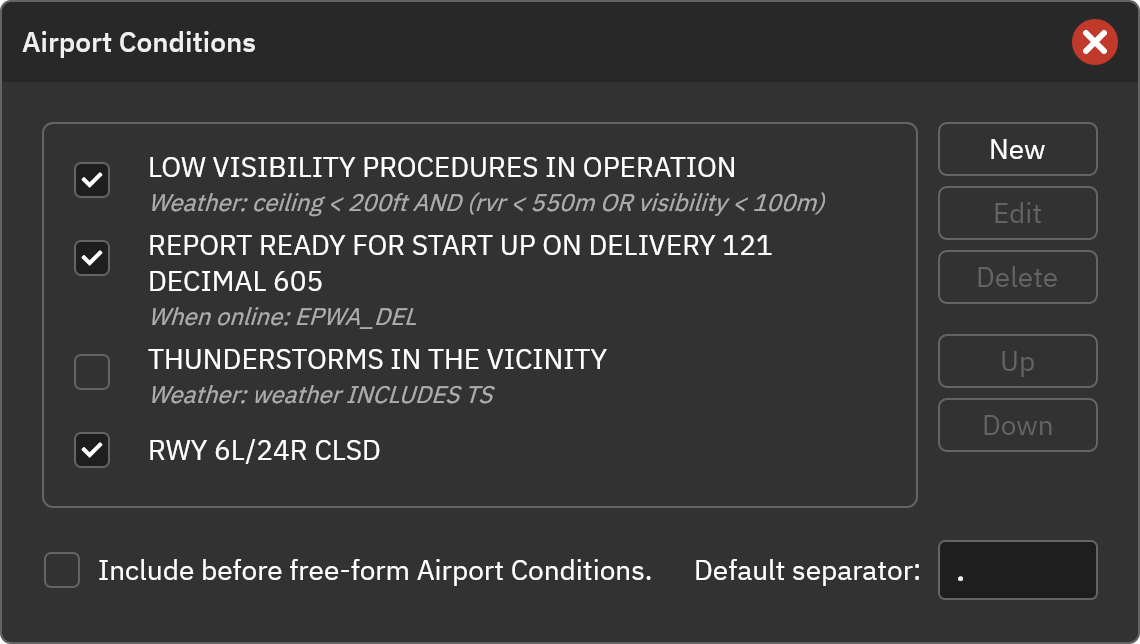
A checked message that has a condition is included in the ATIS only while its condition is met, so a checked row in the list does not always mean the message is being broadcast.
Controllers Online
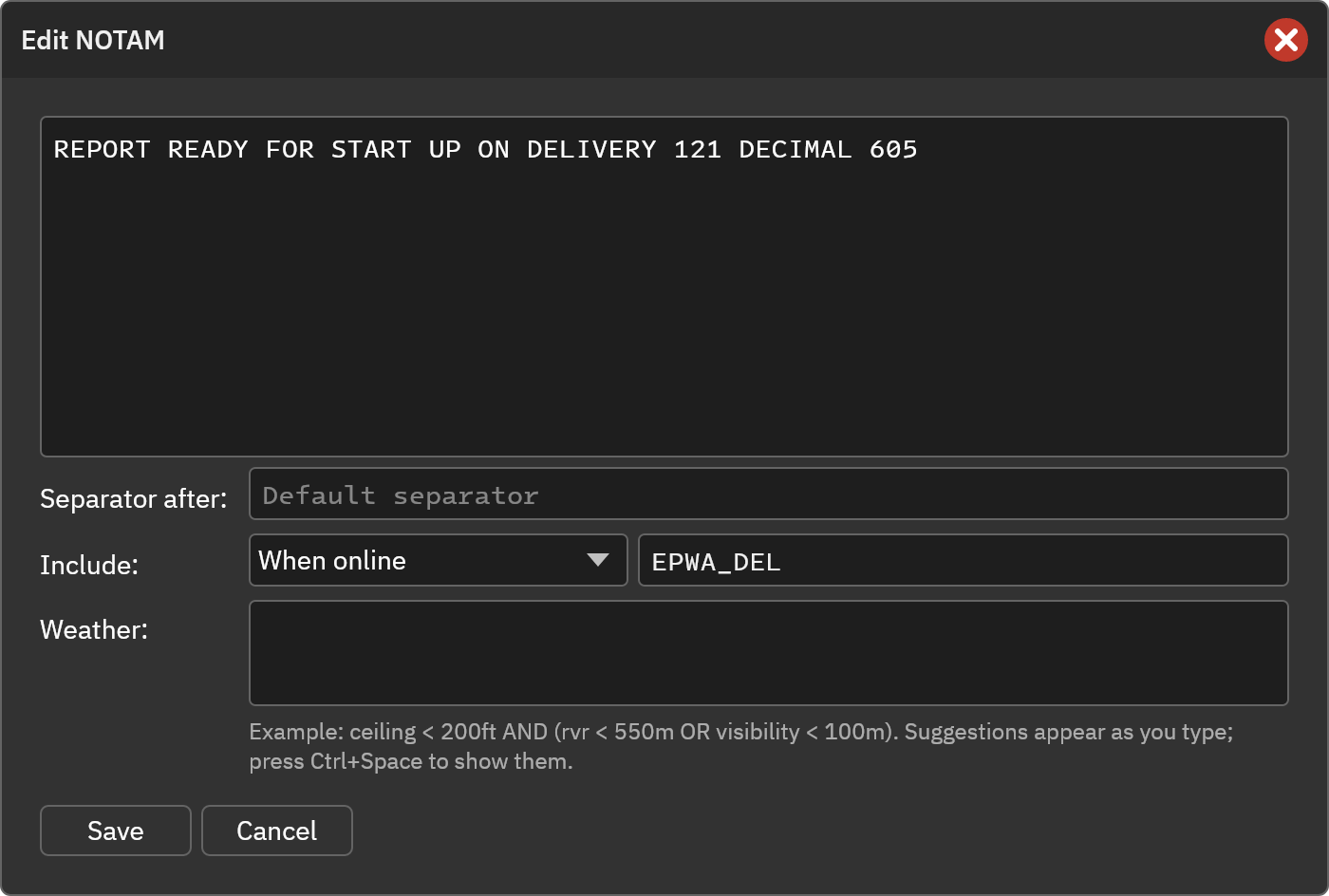
In the Include row, choose when the message applies:
- Always: The message has no controller condition.
- When online: The message is included while at least one of the listed callsigns is online.
- When offline: The message is included while none of the listed callsigns is online.
When you choose When online or When offline, enter one or more callsigns, separated by commas or spaces. Callsigns are not case-sensitive, and the whole callsign must match. Use * as a wildcard for any run of characters:
| Entry | Matches |
|---|---|
EPWA_DEL | Only EPWA_DEL
|
EPWA_APP, EPWA_F_APP | Either callsign |
EPWW_*_CTR |
EPWW_W_CTR, EPWW_E_CTR, … (but not EPWW_CTR, which has only one underscore) |
EPWW_*CTR |
EPWW_CTR, EPWW_W_CTR, EPWW_E_CTR, … |
EPWA_* | Any EPWA_ position, including Tower and Ground |
Observers and ATIS connections are not counted as controllers.
Example: Frequencies that depend on who is staffed
Some airports give different instructions depending on which positions are staffed. These NOTAMs are set on the same station, and in each pair only one is included at a time. The wording is only an example:
| NOTAM | Include | Callsigns |
|---|---|---|
| REPORT READY FOR START UP ON DELIVERY 121 DECIMAL 605 | When online | EPWA_DEL |
| REPORT READY FOR START UP ON TOWER 119 DECIMAL 980 | When offline | EPWA_DEL |
| AFTER DEPARTURE CONTACT APPROACH 121 DECIMAL 075 | When online | EPWA_APP |
| AFTER DEPARTURE CONTACT TOWER 119 DECIMAL 980 | When offline | EPWA_APP |
Where the online list comes from
vATIS reads the list of online controllers from the VATSIM data feed.
- The feed is refreshed every 30 seconds, so a controller logging on or off can take up to 30 seconds to show up.
- If the feed cannot be reached, vATIS keeps the last list it received. Until it has received one, nobody is considered online: When offline messages are included and When online messages are not.
Weather
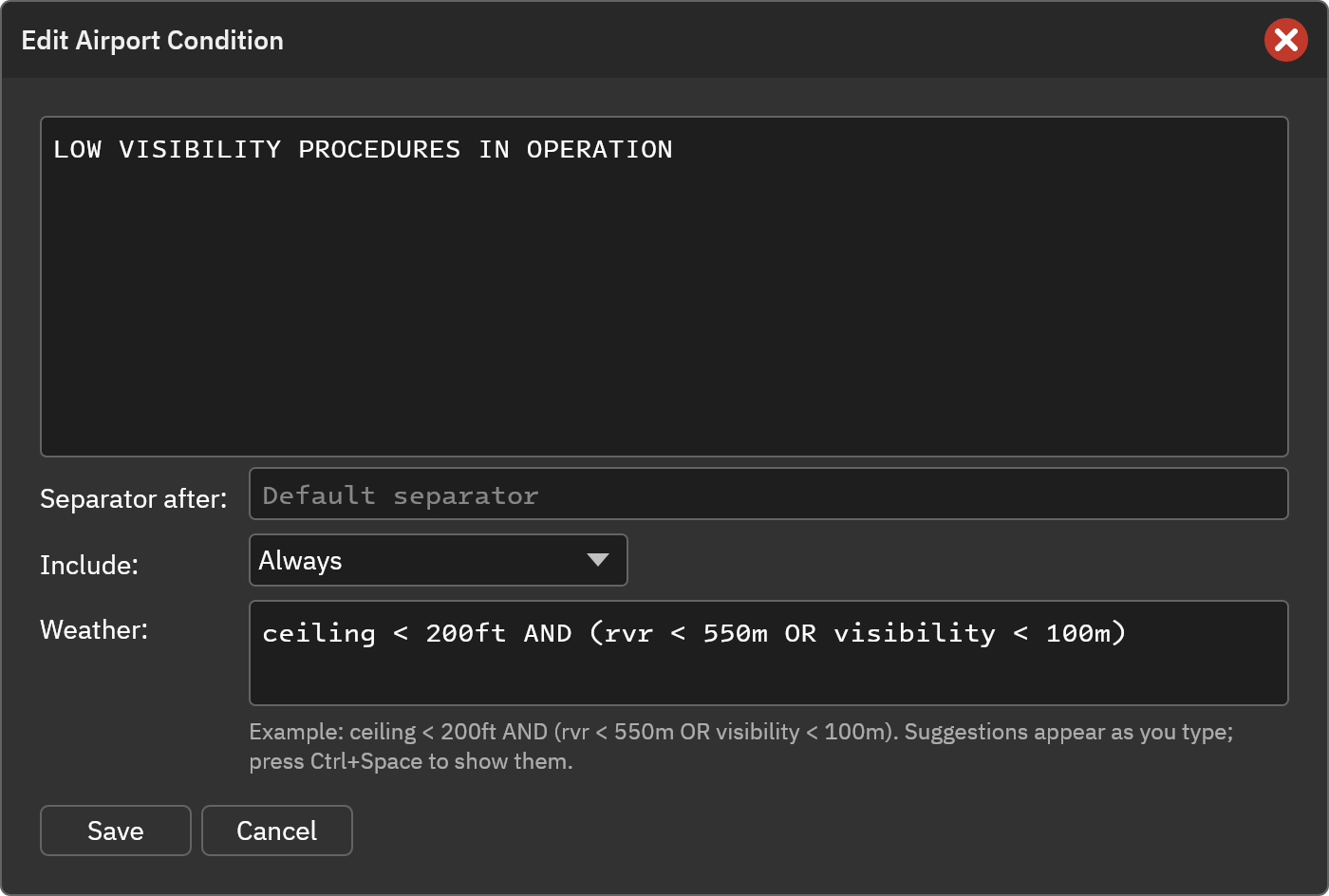
Type a condition in the Weather box. The message is included while the METAR meets the condition. A message with an empty Weather box is not affected by the weather.
A condition is made of comparisons, such as ceiling < 200ft, joined with AND and OR, negated with NOT, and grouped with parentheses:
ceiling < 200ft AND (rvr < 550m OR visibility < 100m)
Field names, units and keywords are not case-sensitive, and conditions can be spread over several lines. If the condition is not valid, vATIS shows what is wrong and where, and will not save the message until it is fixed.
Suggestions
vATIS suggests what can come next as you type: field names, comparisons, units and weather codes. The list appears as you type a word, after a space and after an opening parenthesis, and you can open it at any time with Ctrl+Space. Choose a suggestion with the arrow keys and press Enter or Tab, or double-click it. Typing anything else just closes the list, so your own text is never replaced.
Comparisons with numbers

Write a field, a comparison, and a number with an optional unit. Without a unit, the first one listed for the field is used.
| Field | Also written | Compares | Units |
|---|---|---|---|
ceiling | Height of the ceiling: the lowest cloud layer of the types set as ceiling in the Clouds format (broken and overcast by default) |
ft, m
| |
cloudbase | Height of the lowest cloud layer of any coverage |
ft, m
| |
rvr | The lowest runway visual range reported |
m, km, ft
| |
visibility | vis | Prevailing visibility. CAVOK counts as 9999 m |
m, km, ft
|
windspeed | wind | Mean wind speed |
kt, kmh, mps
|
gust | windgust | Gust speed |
kt, kmh, mps
|
winddir | winddirection | Mean wind direction. Variable winds (VRB) never match | deg |
temperature | temp | Air temperature |
c, f
|
dewpoint | dew | Dewpoint |
c, f
|
qnh |
pressure, altimeter
| The pressure setting, converted if the METAR uses the other unit |
hpa, inhg
|
depth | runwaydepth | The deepest deposit in the METAR’s runway condition groups | mm |
The comparisons are < (below), <= (at or below), > (above), >= (at or above) and = (equals). The number is converted from the unit you write, so ceiling < 200ft works whether the METAR reports the ceiling in feet or in meters. Units can follow the number directly or after a space: 200ft and 200 ft are the same.
Comparisons with codes
weather and cloudtype check for codes in the METAR, using INCLUDES or EXCLUDES:
| Field | Also written | Looks for |
|---|---|---|
weather | wx | Present weather codes, e.g. TS, FZRA, +SN, FG
|
cloudtype | Cloud types CB and TCU
|
weather INCLUDES TS is met while a thunderstorm is reported. To look for more than one code, separate them with commas, weather INCLUDES TS,FZRA, or put them in quotes, weather INCLUDES "TS FZRA". INCLUDES is met when any of the codes is found, and a code matches inside longer ones: RA matches -RA, +RA and TSRA. EXCLUDES is met when none of them is found.
Conditions without a comparison
windshear is met while wind shear is reported, and cavok while the METAR reports CAVOK. Use NOT for the opposite, e.g. NOT cavok.
Note
A comparison is not met when the METAR does not report the value it needs. With no RVR reported, both
rvr < 550mandrvr > 550mare false. UseNOTorEXCLUDESto test for something being absent. Before the first METAR has been received, no weather condition is met.
Combining comparisons
AND is evaluated before OR, as in ordinary logic, so
ceiling < 200ft AND rvr < 550m OR visibility < 100m
means (ceiling below 200 ft and RVR below 550 m) or visibility below 100 m. Use parentheses to change the order:
ceiling < 200ft AND (rvr < 550m OR visibility < 100m)
means the ceiling is below 200 ft, and either the RVR is below 550 m or the visibility is below 100 m. Parentheses can be nested, for example ((A OR B) AND C) OR D. NOT applies to the condition or group that follows it: NOT (windshear OR cloudtype INCLUDES CB).
Examples
Each row shows a different part of the condition language.
| Message | Weather condition | Shows |
|---|---|---|
| STRONG GUSTY WINDS | gust >= 30kt | A number field with a unit and >=
|
| CALM WIND | windspeed = 0kt | The = comparison |
| LOW CLOUD IN THE VICINITY | cloudbase < 500ft | The lowest cloud layer of any coverage, unlike ceiling
|
| LOW PRESSURE, CHECK ALTIMETER SETTING | qnh < 1000hpa | A pressure setting and its unit |
| STRONG WESTERLY WIND | winddir >= 240deg AND winddir <= 300deg AND windspeed >= 20kt | Wind direction, and AND with three comparisons |
| RWY CONTAMINATED | depth > 3mm | Runway deposit depth in millimeters |
| ICING POSSIBLE | temperature <= 3c AND dewpoint >= -3c |
<=, AND, and a negative number |
| FOG, EXPECT DELAYS | wx INCLUDES FG AND vis < 800m | The alternative field names wx and vis
|
| THUNDERSTORMS IN THE VICINITY | weather INCLUDES TS OR cloudtype INCLUDES CB |
INCLUDES with weather and cloudtype, and OR
|
| DEICING NOT REQUIRED | temperature > 3c AND weather EXCLUDES "FZRA FZDZ" |
EXCLUDES with more than one code in quotes |
| WINDSHEAR REPORTED ON FINAL | windshear | A condition without a comparison |
| VISUAL APPROACHES AVAILABLE | cavok |
cavok, also without a comparison |
| ILS APPROACHES IN USE | NOT cavok |
NOT in front of a condition: the opposite of the row above |
| NO WINDSHEAR OR CUMULONIMBUS REPORTED | NOT (windshear OR cloudtype INCLUDES CB) |
NOT in front of a group in parentheses |
| LOW VISIBILITY PROCEDURES IN OPERATION | ceiling < 200ft AND (rvr < 550m OR visibility < 100m) | Parentheses to group OR before AND
|
When Conditions Are Checked
- When a station is connected, the ATIS is rebuilt as soon as a new METAR arrives, or when a controller logging on or off changes which messages apply. vATIS only rebuilds when the set of included messages actually changes.
- The ATIS letter is not advanced by these changes. It advances for a new METAR in the usual way, but a controller logging on or off will update the ATIS text under the same letter.
- The free-form text area in the main window lists the static messages that currently apply, so you can see what will be broadcast.
- The Sandbox evaluates weather conditions against the METAR in its METAR field, and controller conditions against the current list of online controllers.